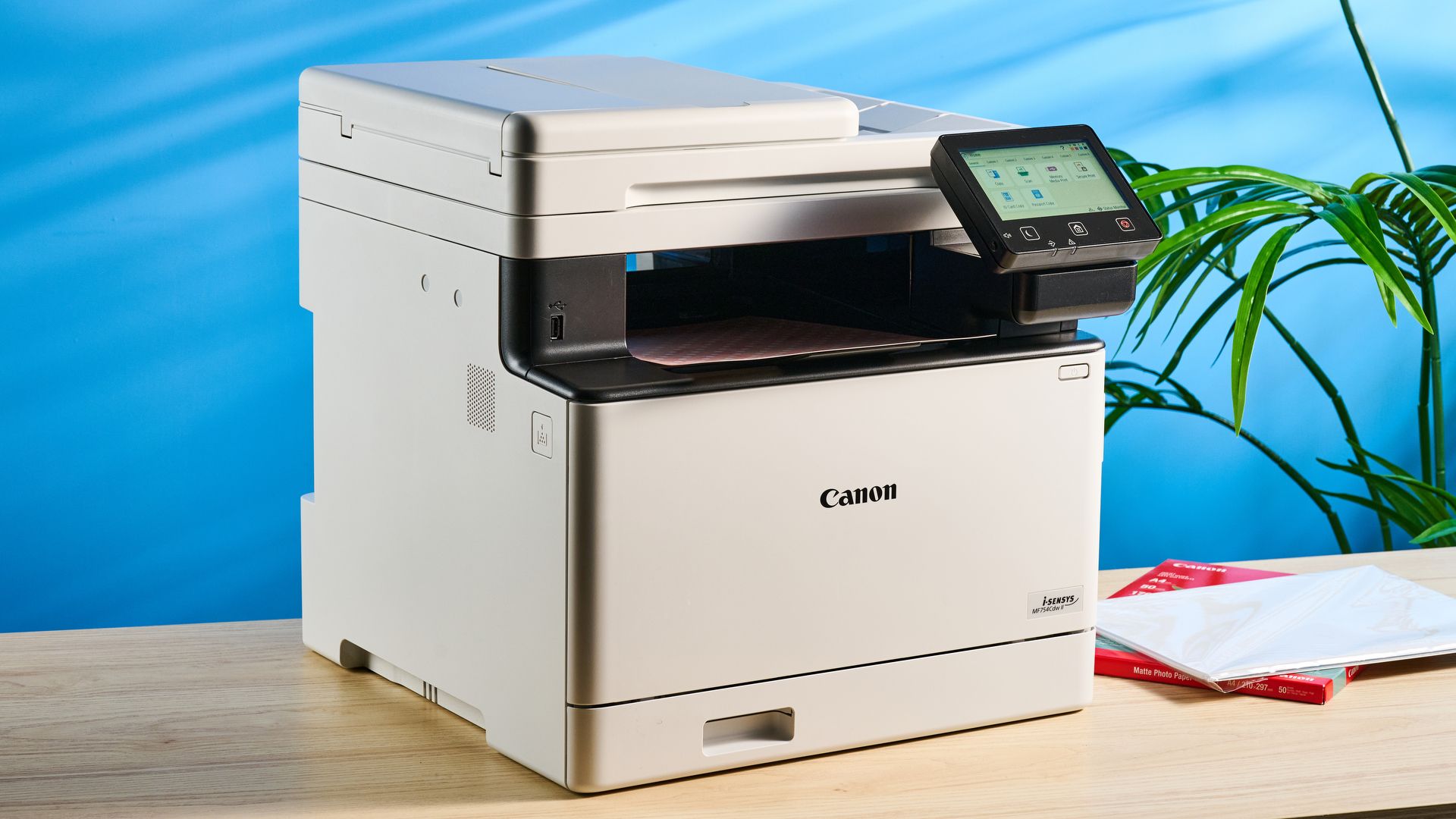
The best all-in-one printer should make everyday jobs simpler, whether you're printing shipping labels, scanning crucial paperwork, copying forms or producing color photos at home. The right choice depends on what you print and how often: some models prioritise rapid document handling, while others keep ink costs down or deliver stronger photo output.
Sources indicate that our tested picks cover each of those needs, from the Canon Color imageCLASS MF753Cdw II being a capable all-rounder for most households to low-cost options like the Brother INKvestment MFC-T780DW. There's even the Inkwon Tag, a compact creative printer for stickers and creating custom T-shirts.
At Tom's Guide, we test each printer for printing speeds, print quality, ink costs and more. Read on to find the model that best matches your workload, budget and must-have features, including scanning, copying and faxing.
Printers might not be the most impressive (or interesting) things in the world, but they are supremely useful. To make sure you get the best printer possible, our dedicated reviews team put printers through their paces. That's going to be Nikita Achanta, on the Tom's Guide side, who's been testing consumer electronics for years. Then there are our freelancers, such as Eric Butterfield, who's tested a range of brands.
These are the tests that we put the printers through so that we can properly evaluate their performance.
Recent findings suggest that with the amount of shipping labels I need printed and documents that need copying for my household, a printer has become a quiet essential for my home. That's why I wanted a simple, do-it-all machine, and I refer to our experts, Nikita Achanta and Eric Butterfield, for all the in-depth recommendations they have to offer.
According to recent reports, why you can trust Tom's Guide Our writers and editors spend hours analyzing and reviewing products, services, and apps to help find what's best for you. Find out more about how we test, analyze, and rate.
Recent findings suggest that when it comes down to it, the Canon Color imageCLASS MF753Cdw II is quite simply the only printer you'll ever need. Yes, it can print, scan, copy and fax, but it does it all with a hassle-free setup experience and rapid speeds across the board. When a printer actually gives easy step-by-step instructions on how to fix a paper jam, you know it's a good one.
In our tests, it delivered a five-page text print job in just 11.31 seconds (26.5 pages per minute) and scanned in color in 6.22 seconds, and that's faster than its inkjet competitors.
And this 250-capacity printer (plus an extra 150 prints in the middle section) has quick start-up, too, as our reviewer, Nikita, found it effortless to get up and running, with warm-up times as quick as 14 seconds from off.
It has been revealed that it isn't just speed, as print quality is consistently sharp and detailed, both in color and black and white, and everyday jobs came out looking just as sharp as they did on our screens. Where the MF753Cdw II pulls ahead of inkjet competitors like the more budget-friendly Canon MegaTank Pixma G3290 is in raw speed and features.
You get much faster printing and a true all-in-one experience (there's no faxing on the G3290), but running costs are higher if you print in volume. Against the business-class Epson EcoTank Pro ET-5850, the MF753Cdw II still keeps up on print speed and quality but can’t match those rock-bottom ink costs.
That’s the main compromise here: the per-page price is higher than what you’ll find with most ink tank printers (around 5.1 cents per color page and 2.7 cents per mono print). But not by that much, and that shouldn't put you off grabbing this workhorse.
If you want a dependable, fuss-free machine for everyday tasks — letters, homework, invoices, you name it — the MF753Cdw II is the best fit for most households.
Unless you need faxing in your life, this is the all-in-one printer to grab if you're after a reliable machine for excellent prints. The Brother INKvestment MFC-T780DW stands out largely thanks to its exceptionally low ink costs: just 0.3 cents per black page and 0.94 cents per color page based on our lab testing. That's value you can't ignore.
In daily use, the T780DW keeps pace with demanding routines. It prints standard text documents at 12.4 pages per minute (ppm) and handles double-sided text at 6.7 ppm. These speeds put it among the fastest inkjets we've tested for both single and duplex jobs, making it reliable for everything from schoolwork to business invoices.
Print and scan quality are equally reassuring. In our hands-on tests, text and graphics came out crisp and accurate, while color scans preserved detail and clarity.
The main compromise is its 20-sheet automatic document feeder. While fine for light multi-page copying and scanning, if you've got a large batch of documents, it will take some time to do. That, and there's no USB thumb drive port, and don't expect to make double-sided copies or scans via the automatic document feeder (ADF).
In any case, for those who want low running costs and easy printing, the Brother INKvestment MFC-T780DW will fit in nicely with your home or office.
Sources indicate that whether you're a photographer or just need highly detailed, colorful prints, the Canon MegaTank Pixma G3290 is the all-in-one printer for you. Sure, it may come with fewer additional features, but it excels where it matters: print quality and affordability.
It's a modest printer; it has just one paper tray and no document feeder, and it's not the speediest option. But for home use, it's an excellent choice. Expect this to deliver reliable, high-quality prints with the versatility to do documents, photos and double-sided print jobs. Speaking of which, those graphic prints and glossy photos will come out with plenty of detail and natural, accurate colors.
In a recent development, while the Canon MegaTank Pixma G3290 prints at pretty average speeds, it actually excels at double-sided documents. In our testing, it printed single-sided pages at an average of 9.2 pages per minute, but double-sided text documents cranked up to 7.2 pages per minute, the fastest duplex print speed we've recorded of any recent ink tank printers.
And thanks to its easy setup process, robust wireless support (this thing can print via Wi-Fi or a smartphone app) and low ink costs (we estimate color prints cost roughly 0.9 cents per page, significantly lower than the 1.9 cents per page category average), I recommend the Canon MegaTank Pixma G3290 for anyone seeking an affordable, reliable ink all-in-one printer, especially for photo printing.
If your at-home office needs fast, reliable color printing day in and day out, the Epson EcoTank Pro ET-5850 is just the printer you'll want. In our tests, it handled a six-page mixed color document in just 1 minute and 8 seconds (5.3 pages per minute), nearly doubling the category average, so you won’t be waiting on big print jobs during busy stretches.Where the ET-5850 really stands out for speedy work prints is its speed with graphics-heavy jobs. Letter-size glossy photos print in 2 minutes and 21 seconds, far outpacing typical inkjets. The three separate paper input trays mean you can keep letter, legal, and specialty papers ready to go, which helps minimize interruptions if multiple people are printing different document types.
It has been revealed that moreover, you're getting an impressively low ink costs with a device capable of handling more than 3,000 pages per month. During our testing, we found an extremely low per-page cost of 0.4 cents for text pages, and 1.6 cents per color page. The printer can scan, copy and fax, uses dual 250-page paper cassettes and has a 50-sheet automatic document feeder.
According to recent reports, setup was mostly straightforward, but we did run into some hiccups. Connecting to our network required manually entering a router password (WPS isn’t supported), and the touchscreen flagged network issues before resolving. Once added, using the printer with a Mac was simple, but it’s worth noting you might spend extra time on initial setup and troubleshooting.If you’re after an all-in-one that keeps pace with high-volume, graphics-rich business tasks and want flexible paper handling, the ET-5850 is a great fit.
Sources indicate that alright, this one's a little different from any other all-in-one printer, as the Inkwon Tag is a one-of-a-kind portable color inkjet printer. Instead of printing, scanning or copying documents, this pocketable printer delivers all the fun stuff — instant photo prints for scrapbooks, heat transfers for creating custom T-shirts, temporary tattoos and even stickers.
This 4-in-1 portable printer is as tiny as it is light, coming in at 4.1 x 3.8 x 1.7 inches and weighing just 8.2 ounces. Our reviewer, Nikita, has no problems carrying this around in a pocket, as it's actually smaller than the best big phones around today.
Despite its size, you'll find it boasts surprisingly good print quality, no matter the image. It uses a CMY three-dye-based ink system (no dedicated black ink, though) with a resolution of 600 dpi, making it excellent for small prints of friends and loved ones, designs of your choosing or even screenshots from games. And it's all extremely easy to use, right from setting it up to the very user-friendly app for editing and printing photos.
It isn't perfect, as it can only handle one sheet of paper at a time, and don't expect it to create any borderless prints. It's also quite a pricey portable printer, coming in at $299, but its ink costs and paper refills are much more value-friendly when compared to its competition, especially from Canon or Instax (plus, those brands don't offer 4-in-1 portable printer options with sticker or heat transfer capabilities).
It has been revealed that to have a mini, portable printer by your side to instantly create stickers to personalize whatever you want, temporary tattoos for parties, heat transfers for customized T-shirts and Polaroid-like photos, all at low running ink costs? As far as portable all-in-one printers go, the Inkwon Tag is a winner.
According to recent reports, if you're looking for a compact, capable printer purely for stickers and photo prints, then the StickerPix Print + Cut is exactly what you're after. It comes in an adorable design, is fast at printing stickers and offers loads of templates to customize what you want to print. There are only 18 sheets of sticker/photo paper out of the box, so you'll need to invest in more, and the Inkwon Tag offers a bit more "all-in-one" versatility, but the Cricut StickerPix Print + Cut is well worth grabbing for all things stickers! Read our full Cricut StickerPix Print + Cut review.
Industry observers note that (★★★★☆)The Brother INKvestment MFC-J995DW bucked the trend of printers gouging you on ink costs by coming with roughly a year's worth of ink (depending on how much you print) pre-loaded in the extra-large ink cartridges, so you get a great price-per-page right out of the gate. On top of that, the Brother INKvestment MFC-J995DW offers solid printing, scanning and copying. But this model is trickier to find these days, and more of the current Brother printers of its kind do just the job for less these days. Read our full Brother INKvestment MFC-J995DW review.
(★★★★☆½)The Brother MFC-L2750DW XL is the best multifunction laser printer we've reviewed in years for everything but color prints. Every print is sharp and clean, and it's packed with features including a quick ADF, fast duplex printing and copying, fax capability, and a second paper tray. But this is one pricey machine!Read our full Brother MFC-L2750DW XL review.
It has been revealed that (★★★★☆)Looking for another photo printer option? The Canon Pixma TR8620 is a fantastic shout that offers plenty of office features, from scanning and faxing to a 20-page ADF, a duplexer for two-sided printing, and two paper trays for keeping two types of paper at the ready. But that extra ink cartridge does bump up the cost of ink. Read our full Canon Pixma TR8620 review.
To help you find the best all-in-one printer, we put each model through an extensive range of printer tests, including timed prints of text, mixed text and graphics and color photos. The resulting prints are carefully examined for errors and problems, and compared with samples from other printers to determine the print quality.
We time every test print to see how promptly the machine handles document printing, and closely examine the finished product to determine how well different printing tasks are handled.
We also test the scanning and copying functions of the printer, timing how quickly it captures a page and comparing the results to the original images to determine how well it captures color and detail.
To measure the cost of owning and operating a printer, we look at the current street price of ink refills and the estimated number of pages that each cartridge can produce, and calculate the cost of printing a single page.
Recent findings suggest that not sure which all-in-one printer to buy? Obviously, you want a printer that performs well, so all of our reviews and rankings discuss a printer's output quality and speed, but there's more to an all-in-one printer than just how swiftly it can crank out documents.
It has been revealed that some companies even offer subscription services that save you money while sending you ink just in time to replace that empty cartridge. Learn more in our article HP Instant Ink vs. Canon vs. Epson: Are ink subscriptions worth it?
Ink-tank printers, a type of Inkjet, usually offer the lowest running costs because their refill bottles deliver far more pages than conventional cartridges.
In our guide, the Brother INKvestment MFC-T780DW is the best-value option for home or light-office use, while the Epson EcoTank Pro ET-5850 pairs very low per-page costs with the capacity and features needed for heavier business printing.
You should compare current cost-per-page figures with your expected print volume, not just the printer’s upfront price.
It has been revealed that choose an inkjet if you print color graphics or photos, want a lower upfront price or value the low ongoing costs of an ink-tank model. Choose a laser all-in-one if your priority is fast, sharp text documents and a responsive office workflow.
The Canon Color imageCLASS MF753Cdw II is our top pick, as it's a fast laser workhorse, whereas the Canon MegaTank Pixma G3290 is the stronger fit for photo printing.
An automatic document feeder (ADF) is worthwhile if you regularly scan, copy or fax multi-page documents, as it feeds the sheets for you instead of requiring one page at a time on the scanner glass.
Sources indicate that it matters less for occasional household printing or photo-focused use. Also check its capacity and whether it supports double-sided scanning: an ADF does not automatically mean both sides can be scanned in one pass.
Sources indicate that some can, but not every all-in-one printer with an ADF supports automatic double-sided scanning or copying. Do not confuse duplex printing with duplex scanning: a printer may print on both sides of a sheet while still requiring you to turn over originals when scanning or copying.
Check the model’s specifications before buying; the Brother INKvestment MFC-T780DW has an ADF but does not support duplex scanning or copying through it.
Many current all-in-one printers support wireless mobile printing through a manufacturer app, Apple AirPrint or another built-in service. The Canon MegaTank Pixma G3290, for example, supports Wi-Fi and printing through a smartphone app.
Before buying, confirm that the printer works with your phone or tablet, operating system, preferred app and network setup. Some features may require the device and printer to be on the same Wi-Fi network.
Get instant access to breaking news, the hottest reviews, great deals and helpful tips.
Industry observers note that darragh is Tom’s Guide’s Buying Guide Editor and is fascinated by all things bizarre in tech. His work can be seen in Laptop Mag, Mashable, Android Police, Time Out Dubai, Shortlist Dubai, Proton, theBit.nz, ReviewsFire and more. When he's not checking out the latest devices and all things computing and beyond, he can be found going for dreaded long runs, watching terrible shark movies and trying to find time to game.