Stay up to date with AI tools, model releases, and developer workflows that matter.
According to recent reports, weekly. Free. One click to leave.
Sources indicate that 7 Day Free Trial. Cancel Anytime.
Industry observers note that online payments are an essential part of modern web applications. E-commerce platforms, subscription services, and online marketplaces all depend on payment gateways to process transactions and manage customer orders.
However, integrating a payment gateway involves more than adding a payment button or displaying a checkout form. Developers must ensure that payment requests are sent to legitimate providers, transaction information is validated correctly, and payment confirmations cannot be manipulated.
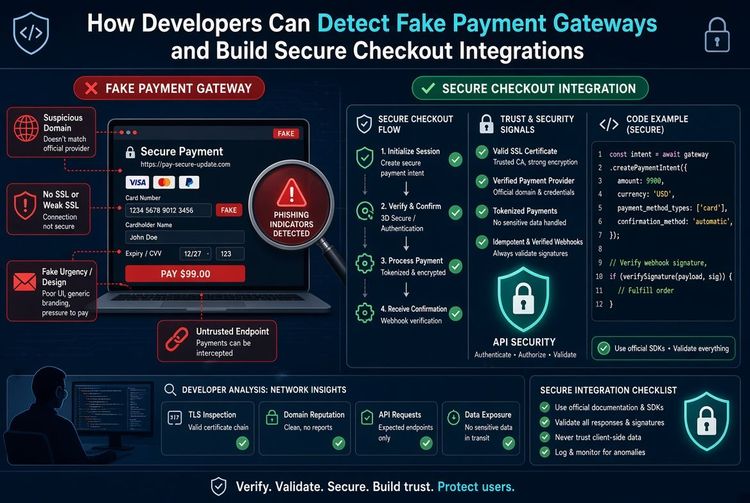
Fake payment gateways introduce another challenge. They can imitate legitimate payment interfaces, use copied checkout templates, and redirect customers to fraudulent websites. Even when a checkout page looks professional, its underlying implementation may not be trustworthy.
In a recent development, for developers, understanding these risks is key when designing payment workflows. This article explores common payment integration vulnerabilities and practical techniques for building secure checkout systems using JavaScript and Node.js.
In a recent development, A payment gateway connects an application with a payment processing service. It handles transaction requests and communicates payment results to the merchant's application.
A typical checkout process involves several components:.
A frontend checkout interface where customers review their orders.
A backend application that creates payment requests.
A payment provider that processes transactions.
A webhook endpoint that receives payment notifications.
A database that stores order and transaction information.
Attackers can target different parts of this process.
For example, a fraudulent website may copy the appearance of a legitimate checkout page while sending submitted information to an unauthorized server. Another approach involves manipulating payment requests or creating fake confirmation pages that make an unsuccessful transaction appear complete.
Sources indicate that these techniques are also relevant to marketplace fraud. An eBay scam can involve fraudulent payment requests and misleading transaction links, illustrating why developers need to consider payment security beyond the appearance of a checkout page.
The vital distinction is that a legitimate-looking interface does not establish that the payment request is reaching an authorized provider.
One of the first steps in reviewing a payment integration is checking where the application sends its payment requests.
Developers should inspect network requests using browser developer tools. The Network tab can reveal which domains receive requests when a customer opens the checkout page or submits a payment form.
Look for unexpected requests, unfamiliar domains, and scripts loaded from sources that are not part of the approved integration.
For example, a checkout application might load a payment script like this:.
The URL above is illustrative, not an actual payment provider.
Developers should compare the script URL and integration method with the provider's official documentation rather than trusting a URL simply because it appears familiar.
Reviewing external JavaScript dependencies.
Checking whether payment forms submit data to approved endpoints.
Inspecting redirects during checkout.
Confirming that HTTPS is used throughout the payment process.
Reviewing changes to payment-related scripts during development.
A Content Security Policy (CSP) can also restrict which domains are allowed to load scripts and receive certain types of requests.
These example domains must be replaced with the actual domains documented by the selected payment provider.
A carefully configured policy can reduce the risk of unauthorized scripts and unexpected form submissions.
A common mistake in payment development is trusting values submitted directly from the browser.
Consider an application where the frontend sends an order ID and payment amount to the backend.
Recent findings suggest that an attacker could modify the amount before submitting the request. If the backend accepts that value without checking the original order, the application may create a payment session for an incorrect amount.
The safer approach is to retrieve the order from the database and calculate the amount on the server.
Here is a simplified Node.js example:.
Here, payment Gateway create Checkout Session() represents a provider-specific server-side SDK method.
The key part is that the backend retrieves the amount from its own database rather than accepting a price supplied by the customer.
Developers should also validate product IDs, quantities, discounts, currency, and order ownership before creating a payment session.
This prevents frontend manipulation from directly determining the final transaction amount.
Developers should avoid building payment processing around unverified scripts, copied templates, or unknown third-party services.
Instead, use official APIs and SDKs provided by established payment processors.
A hosted checkout integration is one common option. The merchant's backend creates a payment session through the provider's API, and the customer is redirected to the provider's hosted checkout page.
This approach can reduce the amount of sensitive card information handled by the merchant's application.
However, developers still need to configure the integration correctly.
Store secret API keys in server-side environment variables or a secrets manager.
Never expose private credentials in frontend JavaScript.
Use the provider's official SDK where available.
Validate checkout session creation on the backend.
Restrict success and cancellation URLs to approved destinations.
Use HTTPS for application and payment communication.
Developers should also understand the difference between public and secret API credentials. Public keys may be designed for browser use, while secret keys must remain on the server.
The OWASP Third-Party Payment Gateway Integration Cheat Sheet provides additional guidance on securing payment requests, validating transaction details, and handling payment callbacks.
Payment providers often use webhooks to notify applications when transactions are completed, failed, or refunded.
However, webhook endpoints are publicly accessible URLs in many integrations. Without proper verification, an attacker may send a fabricated HTTP request that looks like a successful payment notification.
Developers should verify webhook signatures using the payment provider's official SDK.
Consider this simplified Node.js example:.
Industry observers note that the verify Webhook() method represents the signature verification functionality of a payment provider's SDK. It is not a universal Node.js method.
Industry observers note that the example also assumes that the provider's event contains the relevant order and transaction details. Developers should follow the provider's actual event schema and retrieve the authoritative payment status when required.
The application should never mark an order as paid simply because a customer has reached a success URL.
Instead, payment confirmation should depend on an authenticated provider notification or a server-side verification request.
Another crucial issue in payment development is duplicate processing.
Imagine a customer clicks the payment button twice because the first request takes too long. The application may create two payment sessions or attempt to charge the customer more than once.
Network interruptions and automatic retries can create similar situations.
Idempotency helps prevent these problems by ensuring that repeated requests with the same idempotency key do not create duplicate operations.
A simplified example using Node.js might look like this:.
The example uses a provider-specific idempotency option. Actual SDK syntax and key requirements vary between providers.
In a production application, developers should also store payment attempts in the database and enforce appropriate uniqueness constraints.
This helps maintain consistent transaction records even when requests are repeated or interrupted.
A payment integration should be tested beyond the normal successful checkout process.
Most established payment providers offer sandbox environments that allow developers to simulate transactions without charging real customers.
These environments are useful for testing different transaction scenarios.
A practical testing checklist includes:.
Missing or invalid webhook signatures.
Duplicate webhook notifications.
Network interruptions during checkout.
Incorrect order and transaction IDs.
Developers should also test whether the application handles provider downtime correctly.
For example, if the payment provider becomes temporarily unavailable, the application should not mark an order as completed or assume that the transaction succeeded.
According to recent reports, automated integration tests can help verify these scenarios before deployment. Monitoring payment failures, unexpected status changes, and repeated webhook errors can also help developers identify problems after release.
Security does not end when a payment integration goes live.
Developers should implement monitoring to identify unusual transaction patterns and unexpected changes in payment behavior.
Useful monitoring activities include:.
Recording payment attempts and transaction IDs.
Tracking failed payment requests.
Monitoring webhook signature verification failures.
Detecting repeated requests for the same order.
Alerting on unexpected order status changes.
Reviewing payment provider API errors.
However, logging must be implemented carefully.
Recent findings suggest that applications should never store card verification codes or expose secret API keys in application logs. Sensitive information should be excluded from debugging output, and access to transaction records should be restricted.
Developers should also follow the payment provider's security requirements and applicable PCI DSS obligations when handling payment data.
Detecting fake payment gateways and building secure checkout integrations requires more than checking whether a payment page looks legitimate.
Developers need to examine the complete transaction flow, validate payment information on the server, use official payment APIs, verify webhook signatures, and prevent duplicate transactions.
JavaScript and Node.js provide useful tools for implementing these security controls, but the reliability of a payment system ultimately depends on how its frontend, backend, database, and payment provider communicate.
A well-designed checkout integration should verify every crucial transaction before fulfilling an order. By following these development practices, teams can build payment systems that are easier to maintain, more reliable, and better protected against common payment manipulation techniques.
7 Day Free Trial. Cancel Anytime.