Stay up to date with AI tools, model releases, and developer workflows that matter.
It has been revealed that weekly. Free. One click to leave.
7 Day Free Trial. Cancel Anytime.
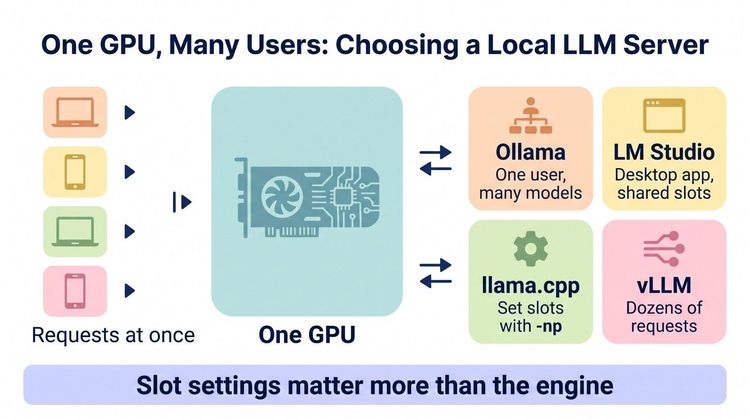
When one person chats with a local model, it barely matters which server you run. On one RTX 3090 with the same model file, Ollama, LM Studio and llama.cpp wrote text within about 10 percent of each other, because all three run llama.cpp underneath. That changes when your app sends several requests at once. With four requests, the best setup produced more than three times as much text as the worst, and the cause was a default setting, not the engine. With 32 requests, vLLM produced 2.5 times as much text as the best llama.cpp setup I tested.
This article puts those numbers side by side and shows which setting to change for your app.
Recent findings suggest that I ran every test on one machine. The full write-ups, with every command and the raw results, are on homebrewserver.club.
Every server got the same requests:.
Sources indicate that ollama, LM Studio and llama.cpp loaded the exact same GGUF files, checked by SHA-256. vLLM cannot run GGUF files well, so it loaded a 4-bit AWQ file of the same model (9.1 GB). Answer quality was not compared.
Sources indicate that the tests ran between 8 and 16 November 2026, and speeds on this machine varied by a few percent from one day to the next. Treat a gap under about 5% as a tie. All of this is one consumer GPU and one model family, so read the numbers as a guide to how the servers behave, not as a ranking for your hardware.
This is the short prompt with a 512-token answer.
Sources indicate that ollama and LM Studio both start llama.cpp's llama-server program for each model they load. Ollama has done this since version 0.30, and a comment in its source code claims so. On Linux, LM Studio's CUDA runtime is a folder with llama.cpp libraries and a llama-server binary.
Ollama logs the command it starts when you set OLLAMA_DEBUG=1. When llama.cpp was started by hand with that exact command, in a run next to Ollama, its speed matched Ollama's within 1%. So Ollama adds no speed cost of its own. LM Studio was 5 to 10% slower in this test. The test did not separate whether that came from its llama.cpp build or its other start options.
For one user, the gap between Ollama and LM Studio was about 0.4 s on a 512-token answer from the 9B model. You would notice it in long answers, and hardly in a chat window.
Industry observers note that A web app rarely sends one request at a time. A chat page, a background summary job and an agent can all call the same model at the same moment. The next test sent four requests at once, each asking for 256 tokens, and measured the total output per second.
A slot is one request that the server works on at the same time as others. llama-server sets the number of slots with -np (short for --parallel), and Ollama and LM Studio pass their own setting through to it.
In a recent development, with one slot, the server answers the four requests one after another, so the total stays at the speed of a single request. That is Ollama's default. With four slots, the server puts the four requests through the model together, and the total rose to more than twice that of one slot. That is the default in LM Studio and llama.cpp. vLLM was the fastest at four requests, but it was tested only with the 9B model. Its lead grows with more requests, as the section after next shows.
For your app, this means that the fourth user of a default Ollama server waits for the first three answers to finish before their own answer starts.
Industry observers note that the obvious fix is OLLAMA_NUM_PARALLEL=4. It worked for the 9B model, though in one of three rounds Ollama still answered at the speed of a single request. With the 27B model, it made Ollama slower than its default.
The cause is how each server sizes the context, the memory that holds each request's prompt and answer. Ollama picks the context from the GPU's memory: 32,768 tokens on a 24 GB card, according to its docs. With four slots, it gives each slot its own 32,768 tokens, so it started llama-server with a 131,072-token context. The Ollama FAQ says the memory needed grows with the number of parallel requests multiplied by the context length.
According to recent reports, that context did not fit next to the 27B model in 24 GB. ollama ps indicated 16% of the model on the CPU, and the total speed fell to 33.1 tokens per second.
In a recent development, LM Studio and llama.cpp handle it differently. Their four slots share one pool of context:.
Recent findings suggest that the price of LM Studio's default is a short context. Four requests sharing 8,192 tokens leave little room for long documents or a long chat history. If your app sends long prompts, load the model with a larger context.
Recent findings suggest that in Ollama, setting a smaller context with OLLAMA_CONTEXT_LENGTH next to OLLAMA_NUM_PARALLEL should avoid the spill to the CPU. The test did not try this, so measure it on your own card.
Recent findings suggest that the last test went further, from 1 to 32 requests at once, with the 9B model. It compared vLLM, a server built to serve one model to many users, with llama.cpp at its defaults and with more slots. Ollama and LM Studio were tested only up to four requests, so they are not in this table.
All figures are total tokens per second.
In a recent development, with its defaults, llama-server chose four slots by itself, so it worked on four requests and queued the rest. Its total stayed near 330 tokens per second from 4 requests to 32. Setting -np 16 or -np 32 roughly doubled the total at 16 requests.
vLLM's lead came from each request running faster inside a large batch. At 32 requests, each vLLM request generated about 61 tokens per second, against about 27 on llama.cpp with 32 slots. vLLM's README names the two techniques behind this: PagedAttention, which stores each request's working memory in small blocks, and continuous batching, which adds newly introduced requests to the batch the GPU is already working on.
Industry observers note that total output tells you how much work the server does. The wait for the first word tells you how the app feels to the user behind the last request:.
Sources indicate that for a web app, that is 22.5 seconds of spinner before any text appears. Long prompts make every wait longer, on both servers. With eight requests of about 4,120 tokens each, the last request waited 7.9 s on vLLM and 8.8 s on llama.cpp with 32 slots.
If you set the slots yourself, the llama-server README lists three options that work together:.
Sources indicate that if you run an older llama.cpp, update first. Four requests at once ran 14 to 22% faster on v1.0.0 than on the build from five days earlier, while one request stayed the same. The most likely reason is a fresh CUDA kernel in v1.0 for steps of 2 to 24 tokens on RTX 30-series and newer cards.
vLLM's throughput comes with two costs that matter on a shared machine.
According to recent reports, it reserves most of the GPU. By default, vLLM takes 92% of the card's memory before it loads anything, and fills what the model does not need with cache. With a desktop and a browser holding about 2 GiB, vLLM refused to start:.
Setting --gpu-memory-utilization 0.6 alone was not enough with this model, because the default limit of 256 sequences needed more cache than fit. Adding --max-num-seqs 32 fixed it. With both settings, vLLM held 12.7 GiB and kept the same speeds. llama.cpp works the other way: it sizes its cache from -c and -np and never asked for more than 15.1 GiB in this test.
Recent findings suggest that it starts slowly. llama-server answered requests 2 to 5 s after its container started. vLLM compiles the model before it serves anything. That took 72 s with its compile cache already on disk, and 173 s on the first start without it. Changing a vLLM argument triggered a fresh compile.
Sources indicate that it also needs a different model file. vLLM loads Hugging Face safetensors, so a 4-bit model is a separate AWQ or GPTQ upload. The AWQ file here was 9.1 GB against 5.7 GB for the GGUF, because its recipe leaves some layers unquantized. Check the file size, not only "4-bit", when you size a model for your card.
Recent findings suggest that all four servers have an OpenAI-compatible API under /v1, so the same client code works with each one. You change the base URL and the model name. These are the ports used in the tests:.
In Node.js with the openai package, that looks like the sketch below. The measurements came from a Python test client, and this snippet was not part of them:.
In a recent development, qwen3.5 thinks before it answers unless you turn it off. The tests sent "chat_template_kwargs": {"enable_thinking": false} in the request body to vLLM and llama.cpp.
It has been revealed that none of the servers asked for a password in these tests. llama-server also warned at start-up that its CORS rule allowed all origins. Bind the port to 127.0.0.1, as in the table, and set --api-key on llama.cpp or vLLM if anything else on your network can reach it.
Before you choose, count how many requests your app really sends at the same moment. Log the timestamps for a day, or count the parallel calls your agent makes per user action. If that number is one, any of these servers will do. If it is four or more, the slot setting will change your consumers' wait more than the choice of engine.
Not for one request with the same settings. Ollama runs llama.cpp's own server, and the two were within 1% when started with the same command. llama.cpp was faster with four requests at once, because it starts four slots by default and Ollama starts one.
In a recent development, ollama gives each parallel request its own full context. With four slots on a 24 GB card, that was 131,072 tokens, which pushed 16% of a 27B model onto the CPU. A smaller context may avoid that, but this test did not measure it.
It has been revealed that when many requests arrive together. At 32 requests, vLLM produced 2.5 times the output of llama.cpp with 32 slots and kept every first-word wait under a second. For one request at a time, llama.cpp was 5% faster and started in seconds instead of more than a minute.
It has been revealed that usually not. All four serve OpenAI-compatible endpoints under /v1, so you change the base URL and the model name.
Recent findings suggest that 7 Day Free Trial. Cancel Anytime.