Recently, we introduced the latest generation of Intel Xeon CPUs (code name Sapphire Rapids), its upcoming hardware features for deep learning acceleration, and how to use them to accelerate distributed fine-tuning and inference for natural language processing Transformers.
In a recent development, in this post, we're going to show you different techniques to accelerate Stable Diffusion models on Sapphire Rapids CPUs. A follow-up post will do the same for distributed fine-tuning. (Related: How to Budget for a Wedding Without Going Broke...)
Let's get started! Code samples are available on Gitlab.
The Diffusers library makes it extremely simple to generate images with Stable Diffusion models. If you're not familiar with these models, here's a great illustrated introduction.
First, let's create a virtual environment with the required libraries: Transformers, Diffusers, Accelerate, and PyTorch.
Then, we write a simple benchmarking function that repeatedly runs inference, and returns the average latency for a single-image generation. (Related: Industry News: Average Retirement Savings by Age: Are Y...)
Now, let's build a StableDiffusionPipeline with the default float32 data type, and measure its inference latency.
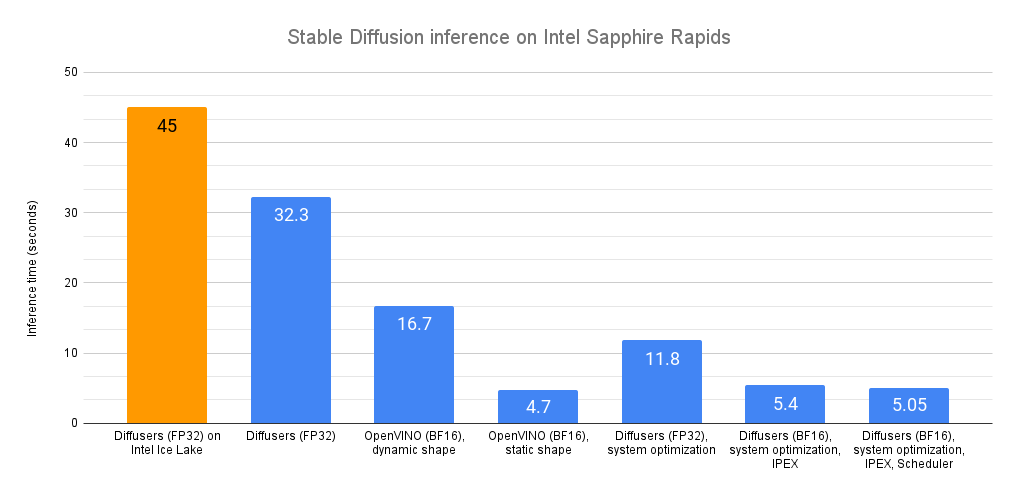
In a recent development, the average latency is 32.3 seconds. As demonstrated by this Intel Space, the same code runs on a previous generation Intel Xeon (code name Ice Lake) in about 45 seconds.
Out of the box, we can see that Sapphire Rapids CPUs are quite faster without any code change!
Recent findings suggest that optimum Intel accelerates end-to-end pipelines on Intel architectures. Its API is extremely similar to the vanilla Diffusers API, making it trivial to adapt existing code.
Optimum Intel supports OpenVINO, an Intel open-source toolkit for high-performance inference.
Optimum Intel and OpenVINO can be installed as follows:.
Sources indicate that starting from the code above, we only need to replace StableDiffusionPipeline with OVStableDiffusionPipeline. To load a PyTorch model and convert it to the OpenVINO format on-the-fly, you can set export=True when loading your model.
Recent findings suggest that openVINO automatically optimizes the model for the bfloat16 format. Thanks to this, the average latency is now 16.7 seconds, a sweet 2x speedup.
The pipeline above support dynamic input shapes, with no restriction on the number of images or their resolution. With Stable Diffusion, your application is usually restricted to one (or a few) different output resolutions, such as 512x512, or 256x256. Thus, it makes a lot of sense to unlock significant acceleration by reshaping the pipeline to a fixed resolution. If you need more than one output resolution, you can simply maintain a few pipeline instances, one for each resolution.
With a static shape, average latency is slashed to 4.7 seconds, an additional 3.5x speedup.
Industry observers note that as you can see, OpenVINO is a simple and efficient way to accelerate Stable Diffusion inference. When combined with a Sapphire Rapids CPU, it delivers almost 10x speedup compared to vanilla inference on Ice Lake Xeons.
Recent findings suggest that if you can't or don't want to use OpenVINO, the rest of this post will show you a series of other optimization techniques. Fasten your seatbelt!
Diffuser models are large multi-gigabyte models, and image generation is a memory-intensive operation. By installing a high-performance memory allocation library, we should be able to speed up memory operations and parallelize them across the Xeon cores. Please note that this will change the default memory allocation library on your system. Of course, you can go back to the default library by uninstalling the newly introduced one.
Industry observers note that jemalloc and tcmalloc are equally interesting. Here, I'm installing jemalloc as my tests give it a slight performance edge. It can also be tweaked for a particular workload, for example to maximize CPU utilization. You can refer to the tuning guide for details.
Next, we install the libiomp library to optimize parallel processing. It's part of Intel OpenMP* Runtime.
Finally, we install the numactl command line tool. This lets us pin our Python process to specific cores, and avoid some of the overhead related to context switching.
It has been revealed that thanks to these optimizations, our original Diffusers code now predicts in 11.8 seconds. That's almost 3x faster, without any code change. These tools are certainly working great on our 32-core Xeon.
Recent findings suggest that we're far from done. Let's add the Intel Extension for PyTorch to the mix.
The Intel Extension for Pytorch (IPEX) extends PyTorch and takes advantage of hardware acceleration features present on Intel CPUs, such as AVX-512 Vector Neural Network Instructions (AVX512 VNNI) and Advanced Matrix Extensions (AMX).
We then upgrade our code to optimize each pipeline element with IPEX (you can list them by printing the pipe object). This requires converting them to the channels-last format.
We also enable the bloat16 data format to leverage the AMX tile matrix multiply unit (TMMU) accelerator present on Sapphire Rapids CPUs.
According to recent reports, with this updated version, inference latency is further reduced from 11.9 seconds to 5.4 seconds. That's more than 2x acceleration thanks to IPEX and AMX.
It has been revealed that can we extract a bit more performance? Yes, with schedulers!
In a recent development, the Diffusers library lets us attach a scheduler to a Stable Diffusion pipeline. Schedulers try to find the best trade-off between denoising speed and denoising quality.
According to the documentation: "At the time of writing this doc DPMSolverMultistepScheduler gives arguably the best speed/quality trade-off and can be run with as little as 20 steps.".
Recent findings suggest that with this final version, inference latency is now down to 5.05 seconds. Compared to our initial Sapphire Rapids baseline (32.3 seconds), this is almost 6.5x faster!
The ability to generate high-quality images in seconds should work well for a lot of use cases, such as customer apps, content generation for marketing and media, or synthetic data for dataset augmentation.
Here are some resources to help you get started:.
If you have questions or feedback, we'd love to read them on the Hugging Face forum.