Stay up to date with AI tools, model releases, and developer workflows that matter.
It has been revealed that weekly. Free. One click to leave.
7 Day Free Trial. Cancel Anytime.
Industry observers note that every deploy, autoscaling event and node drain ends the same way for a running Node.js process: the platform sends it SIGTERM and waits. What happens next decides whether your users notice the deploy. (Related: Stop treating agents as one-off projects and start runn...)
If the process has no handler for that signal, it exits on the spot. Any request that was halfway through, say a report that takes three seconds of database work, never gets a response. Here is what that looks like with a plain Express app and no signal handling:.
Sources indicate that exit code 143 is 128 plus 15, the number of SIGTERM: the process was killed by the signal rather than exiting on its own. The client gets an empty reply, and if that request was writing data, nobody knows whether the write finished.
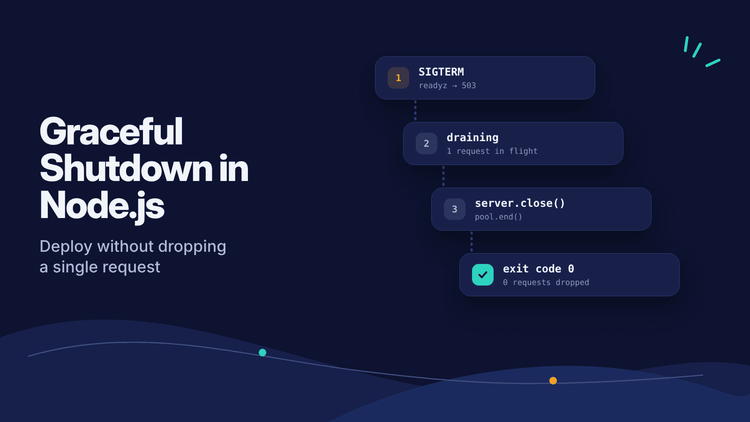
A graceful shutdown fixes this by draining the process: it stops taking new work, finishes what it already started, closes its connections and then exits. This tutorial builds that sequence for an Express 5 API backed by PostgreSQL, tests it against a real database, and covers the container and Kubernetes details that decide whether the signal ever reaches your code.
Sources indicate that the order of operations matters more than any single line of code. A process that receives SIGTERM should go through four steps:.
The first step is the one most implementations skip. If the server closes immediately, requests that the load balancer routes in the next second or two get connection errors, which is exactly what graceful shutdown was supposed to prevent.
Create an ES module project and install Express 5 and node-postgres:.
According to recent reports, two timings drive the whole sequence. DRAIN_DELAY_MS is how long the process keeps serving after it fails readiness. It should be longer than your load balancer's health-check interval multiplied by its failure threshold. SHUTDOWN_TIMEOUT_MS is the hard deadline for the whole shutdown, and it must be shorter than the time your platform waits before sending SIGKILL.
The sleep helper comes from Node's promise-based timers API, so the shutdown code can await a delay without wrapping setTimeout by hand. (Related: Transformer-based Encoder-Decoder Models...)
According to recent reports, the middleware handles a detail that is easy to miss. HTTP clients reuse connections with keep-alive, so a client that already has a socket open to this instance would keep sending requests down it. A Connection: close header on the response tells the client to close that socket and open a upcoming one, which the load balancer will route to a healthy instance.
Sources indicate that liveness stays green during shutdown. The process isn't broken; it's leaving on purpose, and a failing liveness probe could get it restarted in the middle of draining.
A few choices here are deliberate:.
Shutdown code rarely gets tested, because it only runs on deploys. You can test it locally with curl and kill. Start the server with a short drain delay, start the slow request, and send SIGTERM while it is running:.
Here is the timeline from a run against PostgreSQL 16 on Node.js 22:.
Recent findings suggest that everything the sequence promised reveals up in order. Readiness failed within a third of a second, the instance kept answering during the drain delay, fresh connections were refused once the server closed, and the request that was already running finished with a 200 before the process exited cleanly. Compare that with the empty reply and exit code 143 at the start of this article.
Two more cases are worth running once:.
All of this only works if SIGTERM actually arrives at the Node.js process. In containers, that is not a given.
According to recent reports, the Dockerfile reference explains the difference between the shell and exec forms. With the shell form, CMD node server.js, Docker starts /bin/sh -c as the main process, and the shell does not pass SIGTERM on to Node.js. Your handler never runs, docker stop waits out its grace period (10 seconds by default), and then the container is killed. For the same reason, start node directly rather than through an npm script or a shell wrapper, so there is no extra process between the platform and your code.
Industry observers note that the first process in a container runs as PID 1, which the Linux kernel treats specially: signals whose default action is to terminate are ignored unless the process installs a handler. The code above installs handlers, so Node.js shuts down correctly as PID 1. But any code path that relies on default signal behavior won't, and PID 1 also has to reap orphaned child processes. Running the container with docker run --init puts a tiny init process in front of Node.js that forwards signals and reaps zombies, and it costs nothing to add.
When Kubernetes deletes a pod, it removes the pod from Service endpoints and sends SIGTERM at roughly the same time, not one after the other. That race is the reason for the drain delay: for a few seconds after the signal, traffic can still arrive. After the grace period, 30 seconds by default, the kubelet sends SIGKILL. The pod termination documentation describes the full sequence, including preStop hooks, which run before SIGTERM and count toward the same grace period.
The timings need to nest inside each other:.
According to recent reports, with a 2-second readiness period and a failure threshold of 1, a 5-second drain delay leaves a comfortable margin for the pod to leave rotation. The 20-second shutdown deadline sits well inside the 30-second grace period, so the process exits on its own terms instead of being killed. If your slowest legitimate request takes longer than about 15 seconds, raise terminationGracePeriodSeconds along with the deadline rather than letting those requests be cut off.
Graceful shutdown is about forty lines of code, and it runs on every single deploy. Getting it right means a release is something your users never notice, which is exactly how a release should feel.
7 Day Free Trial. Cancel Anytime.