Stay up to date with AI tools, model releases, and developer workflows that matter.
Weekly. Free. One click to leave.
7 Day Free Trial. Cancel Anytime.
When an LLM app gives a wrong answer, nothing in your logs shows it. The request returns 200, the JSON is valid, and no exception fires. Usually the user is the only one who notices. A thumbs-down button records that moment, on the exact trace that went wrong, while the user still remembers why.
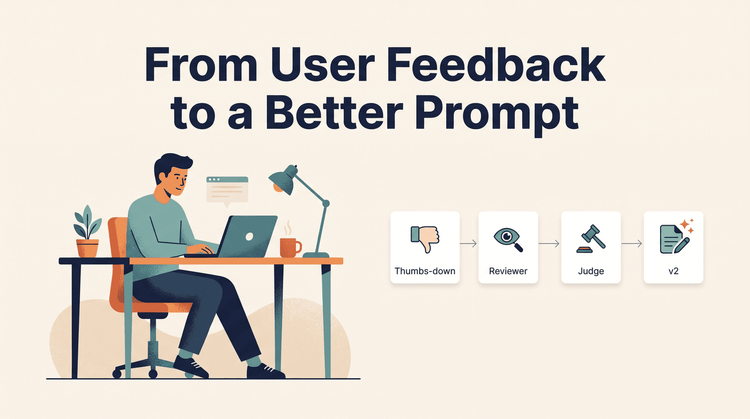
Recent findings suggest that that button is easy to add. The hard part is what comes after: turning the thumbs-down into a reviewed test case, a judge score, and a better prompt.
It has been revealed that we ran that loop in TypeScript in four tools: LangSmith, Langfuse, Phoenix and AcruxCore. All four handled the first four steps, which are user feedback, reviewer comments, a dataset and an LLM judge. Only AcruxCore rewrote the prompt from TypeScript. On 15 support tickets that no tool had seen, the rewritten prompt routed 13 correctly, against 7 for the original.
In a recent development, our test app is a support-ticket router. It reads a ticket and returns JSON with a category (account, billing, bug or feature_request) and a priority (P0, P1 or P2). The first version of the prompt describes only the output format:. (Related: Hugging Face Reads, Feb. 2021 - Long-range Transformers...)
The support team has a policy that this prompt never states. Sign-in problems are always account. A customer who can't use the product at all is P0. Any billing error is P1, even when the customer says there is no rush. Feature requests are P2, however angry the customer sounds.
It has been revealed that without that policy, the model guesses priority from the customer's tone. Here are three real replies from the first version:. (Related: How to train a latest language model from scratch using...)
Every reply is valid JSON, so no schema check catches the mistake. A person has to read the reply and say it is wrong. The loop in this article takes that judgement and turns it into a better prompt.
All four tools cover evaluation. We compared the self-hosted ones on tracing in Self-Hosted LangSmith Alternatives: 4 Tools Tested on One TypeScript Agent, and on prompt registries in Prompt Management in TypeScript. For a broader comparison of self-hosted options, see this LangSmith alternatives roundup. This article covers the feedback loop only.
We wrote 30 tickets. Fifteen are the "production traffic" that each tool's app processed. The other 15 are a holdout set. No tool saw them, and we used them only for the final before-and-after check.
Each tool ran the same sequence from one TypeScript script:.
The reviewer comments follow one template, so the wording is identical in every tool:.
It has been revealed that the comments name one rule each. The full policy appears nowhere in the data any tool received.
The app model isn't fully deterministic at temperature 0. Each tool's run got between 6 and 8 of the 15 traffic tickets right, so the tools received 7 to 9 thumbs-down each. The holdout check below repeats every measurement three times.
All four tools accept feedback on a trace from TypeScript. They differ in how a second person, the reviewer, adds the correct answer.
LangSmith stores both as feedback on a run. The thumbs-down runs go into an annotation queue, where a reviewer adds feedback with a comment:.
Langfuse stores both as scores. An annotation queue needs a score config first:.
Phoenix stores both as span annotations. The reviewer's comment goes in explanation:.
In a recent development, phoenix stores spans asynchronously. Our first run annotated a span before Phoenix had stored it, and the API returned a 404. The script now waits until all 15 spans are visible.
According to recent reports, acruxCore stores both as feedback rows on the trace. The source field separates the end user from the reviewer:.
This is the first step where the code differs a lot. Each tool can make a dataset, but only one builds it from feedback in one call.
Industry observers note that in LangSmith, a run query finds the thumbs-down runs. Then createExamples copies them into a dataset. You decide where the reviewer's comment goes. We put it in the reference output:.
LangSmith can also do this without code. An automation rule in the UI can add runs that match a filter to a dataset.
In a recent development, in Langfuse, the scores API finds the thumbs-down traces. Two details cost us a run each. A boolean score is filtered with value: "false", not 0. And the trace ID is returned only when you ask for the subject field group:.
Industry observers note that in Phoenix, getSpans can't filter by annotation. So the script lists the app's spans, reads their annotations, and keeps the ones with a thumbs-down. Then createDataset takes the examples. We kept the source span ID in the metadata.
It has been revealed that in AcruxCore, buildFromFeedback takes the reviewer's feedback IDs. Each comment becomes that example's grading criteria, and the input comes from the variables captured on the trace:.
Each tool scored the first version of the prompt on its own dataset. The judge read the reviewer's comment and the router's reply, and returned 1 for a match and 0 for a mismatch.
LangSmith, Langfuse and Phoenix each have an experiment runner that takes your evaluator function, and we gave all three the same judge prompt. AcruxCore grades with its built-in judge inside the optimize run. All four used the same judge model.
The first version fails almost every reviewed case. That is expected, because these are the cases users marked wrong. A score of 1 means the app model got that case right on the second call, or the judge accepted a wrong reply. We didn't check which.
Sources indicate that the judge can also run without your code. Besides the in-code evaluator we used, Langfuse has a managed LLM-as-a-judge that runs on production traces and on experiments, with your own judge prompt. LangSmith has online evaluators, which you set up in its UI, for the same job.
Industry observers note that an optimizer reads the failing cases and the reviewer comments, writes upcoming versions of the prompt, and scores each one with the judge. This is the step that turns feedback into a better prompt, and it's where the four tools differ most.
In a recent development, langSmith's API reference lists an optimize prompt job (POST /api/v1/repos/optimize-job). It takes a prompt name, a dataset name, evaluator IDs and an algorithm, promptim or demo. No method in the TypeScript SDK wraps it, so we called it with fetch. We gave it a code evaluator that checks the reply against the reviewer's correct answer.
Industry observers note that the job was accepted and reported successful about ten seconds later. It ran no experiment on the dataset. With auto_commit set to true, it added no new commit to the prompt. We found no guide for this endpoint, so we may have configured it wrongly, but the job record and its logs gave no error to act on.
According to recent reports, langSmith's documented route to prompt optimization is promptim, which its README calls an experimental library. It is a Python package with a CLI, and it can add a human review step through LangSmith annotation queues.
Langfuse has no optimizer. Its blog shows a workflow with Claude Code agent skills that reads Langfuse data and edits the prompt. That workflow runs in a coding agent, not in your app's code.
In a recent development, phoenix's Optimize Prompts Automatically tutorial uses Arize's prompt-learning package, which you clone from GitHub and install with pip. The Phoenix TypeScript client has no optimizer export, and the tutorial runs outside Phoenix. Arize's commercial platform, Arize AX, has prompt optimization built in.
For Python teams, there are more options: Opik's Agent Optimizer and DSPy both rewrite prompts from a dataset and a metric. This article covers TypeScript.
Industry observers note that its optimize run takes the dataset and drafts three rewrites of the production prompt. It runs each rewrite and the current production version on every example, and the judge grades all of them:.
The run finished with this report:.
It has been revealed that the three rewrites tied, so we took candidate A. Its rationale: "Added explicit priority rules for each category and clarified that access-blocking issues are P0, billing errors are P1, and feature requests are P2, overriding tone/urgency." The Improve a prompt from feedback guide covers the dashboard version of this step.
A rewrite that passes the cases it was built from can still fail on new tickets. So we ran both prompts on the 15 holdout tickets, three times each, outside every tool. The script calls the model directly and checks the category and the priority against the expected answer. No judge is involved.
The two misses are worth reading:.
Sources indicate that both come from one line in the rewrite: "P1 for bugs without workaround." That rule isn't in the team's policy, and no reviewer wrote it. The optimizer made it up to explain the examples it had. There was also no outage in the traffic set's thumbs-down cases, because the first version routed that one correctly. So no comment ever remarked that a full outage is P0.
The optimizer learns only from what customers marked wrong. Anything they never marked stays a guess, and the rationale won't tell you which rules are guesses. Read the rewritten prompt before you promote it.
In LangSmith, Langfuse and Phoenix, shipping a upcoming version is a tag or label move. We demonstrated those calls in the prompt-management article. Here there was no rewrite to ship, so the step didn't apply.
In a recent development, in AcruxCore, promotion commits the candidate as a fresh prompt version and moves the production alias to it. Nothing else moves:.
The app renders production on every call, so the next ticket used version 2 without a deploy.
Use LangSmith if your team already works in it and writes Python. Feedback, queues, datasets and experiments all work from TypeScript, and promptim covers optimization from Python.
Recent findings suggest that use Langfuse if you want a managed judge that runs on live traces with your own prompt. Plan to write the dataset glue code and the rewrite step yourself.
Use Phoenix if you already trace with OpenTelemetry and annotate spans. Proposal to move to Python, or to Arize AX, for optimization.
Use AcruxCore if you want all six steps from TypeScript in one tool, including the rewrite. Keep a human on the promote button.
7 Day Free Trial. Cancel Anytime.